Sunday, February 7, 2010

Picture Cutouts and Dropouts

Cutouts

Using pictures as rectangles of different shapes simplifies the design and production process.

The unwanted material around all or part of the subject is removed, either electronically or by graphic artist, and the text is arranged to ‘flow’ around the picture.


A cutout removes the background from a picture – as, for instance, in this picture of a model. The space ‘saved’ can then be filled with text.


Sometimes the text is set over lines of varying length so that it ‘flows’ around the picture, rather than in specific columns, as in this case.


Dropouts

The dropout – or bleach-out - process eliminates tones from a picture, leaving it as a stark black and white image. It is suitable for feature pages, especially for a picture in which the identity of the people involved needs to be concealed.

Resizing Pictures

How To Resize Microsoft Paint Pictures

Step 1
Point your cursor to start, press run and type "mspaint" into the dialogue box.

Step 2
On the program hit the file button, go to open, and select the Microsoft paint pictures that you would like to edit.

Step 3
On top press image and select stretch/skew. Alternatively you can hit ctrl + w.

Step 4
To adjust the width of Microsoft paint pictures, enter a higher or lower number in the horizontal box and press OK.

Step 5
To adjust the height of Microsoft paint pictures, enter a higher or lower number in the vertical section and click OK.


  • Resize Digital Pictures Quickly
Using the Image Resizer

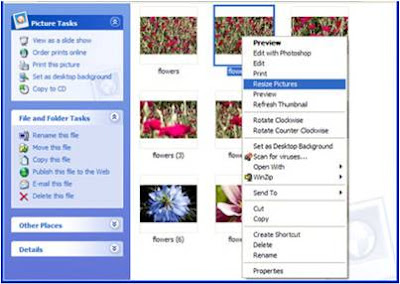
  1. Open the folder that contains the pictures you want to resize. In Thumbnail view, right-click any picture you want to resize, and click Resize Pictures.


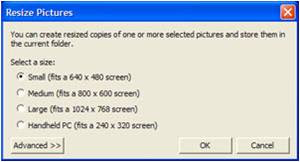
  2. In the Resize Pictures dialog box, click the size you want your photo to be, and click OK. In general, Small is a good selection for most of your needs, such as e-mailing pictures or posting them to a Web site.


  3. The original file is still intact and a new, resized file has been added to the same folder.
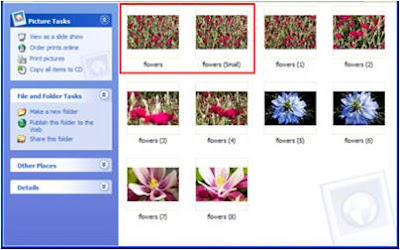

  • Resize multiple photos at once
To resize a sequence of photos at once, click the first photo in the sequence, hold down the SHIFT key, and click the last photo in the sequence. All the photos in between those that you clicked will be selected. Follow the steps outlined previously to resize the sequence of selected photos.

Advanced features
Image Resizer includes some additional advanced features. Click the Advanced tab to show the following options:

  1. Custom lets you manually set the size you want for your photos.\
  2. Make pictures smaller but not larger constrains resizing to only sizes smaller than the original photo.
  3. Resize the original pictures (don't create copies) permanently applies resizing to your original photo.


You can resize your photos by exporting, emailing, or uploading your photos

  • Resize by exporting

The result is newly resized copies of your photos, saved to your hard drive. During the export process, you can adjust both the "Image Size Options" and the "Image Quality" settings in the "Export to Folder" screen.

  • Resize by emailing
If you're sending photos by email, you may want to resize them in order to get under the attachment size limitation.

  • Resize by uploading to Web Albums

If you're sharing a large number of photos, you may not want to upload all of the photos at their original size.

Cropping Pictures

STEP 1 Photo Cropping Tools
N
ot all photo editing tools are created equal. Some are designed to be one-stop solutions and others are for more advanced techniques.

  1. GIMP - open source photo editing software – FREE
  2. Snapfish - basic photo editing tools – FREE
  3. Photoshop CS3 - best advanced photo editing software available - $649
  4. Photoshop Elements - basic photo editing software - $99.99
  5. Corel Paint Shop Pro - basic photo editing software - $79.99

STEP 2
Steps to Crop a Picture

When cropping a picture:
  1. Identify what the subject is.
  2. What is the focal point?
  3. Identify what the subject is not.
  4. Is the background a distraction? Does it add anything to the subject in terms of context? Is it necessary?
It is best to preview the crop before actually cutting the image. This will allow you to see what the final product looks like before you are committed to the edit.


STEP 3 Landscape Cropping Tips

If you shoot landscapes the concept of cropping can be utilized to eliminate distracting background or foreground elements.


Cropping a landscape image can also mean changing the focus of the subject or even adjusting the horizon. Cropping can help to create focus in an otherwise bland photograph. It can also be used to change the orientation of an image, from horizontal to vertical.


STEP 4 Portrait Cropping Tips

  1. Never crop a person at a joint (elbow, knee, wrist, or ankle). Instead try cropping the image between the joint
  2. When photographing an overweight individual, head and shoulder shots are best. You can crop a full length shot to include only the head and shoulders of the subjects. This will also create a closer up image, allowing you to see faces and expressions better.

STEP 5 General Photo Cropping Tips

  1. Try not to put the subject directly in the middle of the photograph and adhere to the rule of thirds.
  2. Look for lines and shapes in your image. Try and place the lines so they are leading your eyes into the image not out of it. This is especially important if your subject is a person.

STEP 6 How to Minimize Cropping

When you are shooting an image, look around the frame before you take it, eliminate or "crop" out any areas that are undesirable by zooming or stepping to one side or another.


By "cropping" a picture when shooting the image, you eliminate the need for further processing later on.

Thursday, February 4, 2010

Picture Spreads

There are events – royal weddings, village carnivals and dramatic rooftop rescues – when pictures tell the story and a paper uses them to fill a complete page or more. In laying out stories, one should be selected as the ‘lead’ or main picture and the others used at a smaller size. Readability studies have shown that pictures are one of the most popular elements in a newspaper. For that reason alone, important pictures should be large and positioned in a manner that maximizes their display.

Pictures of two-column widths or more should be placed on a page so they stand or hang from something that gives them support. Pictures and headlines that are not related should be separated by more than a rule, if the possibility exists that, when placed together, they are humorous or in bad taste.

Avoid any clashing items. For example, do not place an accident story next to a mortuary advertisement. (Discuss the placement of advertisements with your editor or the CE newspaper publisher.)

Do not give a picture more display space than it deserves, especially a "mug shot" (portrait-type, close-up photograph of an individual). Mug shots can float in copy, but it is best if they stand on or hang from something. If a mug shot floats, it is best to float it within a sentence in a paragraph. Mug shots should be accompanied by at least a name line for identification. By omitting the name line, the reader is forced into trying to identify the individual in the picture.

Try to avoid running pictures on the horizontal fold of a newspaper, because the area along the fold becomes distorted once the newspaper has been folded.

Laying-out

The importance of laying-out or make-up can be gleaned from the fact that a newspaper is like any commodity, commercial for a matter, which will sell if it can prove its utility and attraction to the prospective buyer. The same thing is true with the news. If the newspaper does not attract buyers, then it will fold up in no time at all.

In making the lay-out of the newspaper, we must be also guided by a known as dummy. A dummy sheet is a piece of paper which has measurement in length and depth and will determine more or less page.


Types of Lay-outs


Symmetrical lay-out
- the deskman is always governed strictly by the laws of symmetry, but this is not true in the case of an informal balance.


Quadrant make-up
– divides the newspaper page into four parts. Each quarter has its own story.


Horizontal make-up
– the appearance of the page is horizontal rectangles the effect on the eyes is made by multi-column heads
.

Circus make-up
– no symmetry and there are star performers, like a sensational picture or a boxed human interest story.


Brace make-up
– is characterized by angular shelf-like arrangement of content. The deskman usually projects the effect by making a four column-head, that is what you call a red-out or a drop-head of, two or three columns. The story follows below and at the top is shelf.


How to Select Photos

Questions that will be answered by the picture editor:

  • How does the photograph classify, is it a feature or news picture? If it will “save” for a month or two, it is probably a feature picture. If it synchronizes with the day’s news, it is a news picture.
  • Is it forbidden matter such as lottery or raffle? Is it salacious or otherwise improper for public display?
  • What elements give the picture news or feature value? How unusual is the news event that is pictured?
  • Does the picture simply illustrate- or does it tells a story?
  • Is it blurry, furred out of focus and not printable?
  • How large a cut should be made of the picture? Are there parts that could and should be eliminated?
  • What shall be its position and setting in the newspaper? On what page and at the top of what columns shall it be placed? What captions and texts does it require to show off its advantages?


Pointers in selecting out pictures:

  • Photos should be cropped to eliminate unnecessary detail and to focus attention on the theme.
  • A photo should not lie right next to a heavily-shaded ad.
  • Multiple column photos as a rule be in the upper left hand corner.
  • Crowded, posed photograph should be avoided.
  • Retouch whenever necessary, radio-photos specially, but leave this technical detail to the staff artist.
  • If you think a photo should be displayed two columns ask yourself if it wont look handsomer in three. Same goes for three.
  • Unless very necessary don’t soften the impact of a photo with worked-in arrows, broken lines, super impositions or any kind of additional pointers not originally in the photo.
  • Have your photos scaled correctly.
  • If the dominant figure in a photo doesn’t face the page, or the story direct the engraving department to reverse the film.
  • When making out orders for photos, be sure that caption goes with photograph.
  • Allot space in your dummy for caption material.
  • The back of the photo should carry pertinent legend: width and height or depth of cut, slug or label, and page.
  • A final check before tossing the stuff in the basket may save you a lot of trouble, too.
  • Don’t forget the caption lead-in or the display line or whatever style your paper has adopted.

Sample News Photographs

Feature Photo
Taking the Plunge
A man prepares to dip in the icy Ob River in Russia's Siberian city of Novosibirsk, with the air temperature at about minus 22 degrees Fahrenheit, during an Orthodox Epiphany celebration on Jan.19. Orthodox Christians believe the annual swim cleanses them of sin and protects their health.


News Photo
Surrounded by the Law

Protesters clash with police Jan. 20 near the courthouse in Amfissa, northwest of Athens, where two police officers are standing trial on homicide charges for the fatal shooting of a teenager in December 2008. The shooting sparked Greece's worst riots in decades.


News Photo
A mother's agony

Armante Cherisma cries in front of the body of her 15-year-old daughter, who was killed by a policeman responding to reports of lootings on a street in Port-au-Prince on Jan. 19.


News-Feature Photo
Military formation
Indian soldiers form a human pyramid on motorcycles during a rehearsal for the Republic Day parade in New Delhi on Jan. 18. India celebrates its Republic Day on Jan. 26.